📸 CosaNostra: a task app for small teams checks completion photos against a reference image with AI
In brief
- 📋 CosaNostra brings client orders, tasks, checklists and shifts of small field teams into one app for iOS and Android.
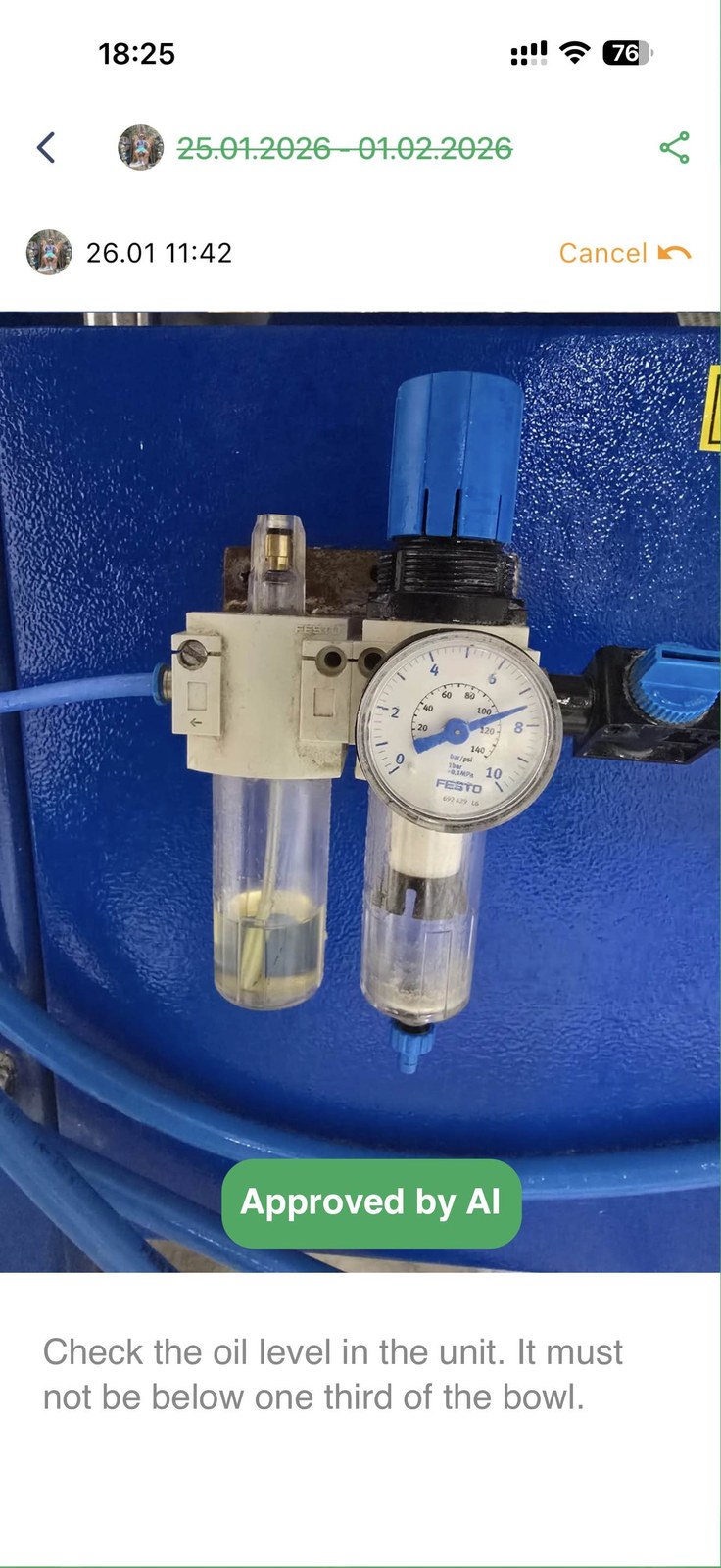
- 📸 Workers photograph finished work; an AI compares the photo with a reference image and flags what does not match.
- 🎙️ Tasks can be created by voice; screenshots of client chats turn into jobs.
- 💶 Free for up to 2 users, team plans from $5.99 a month for 5 people.
📋 [CosaNostra](https://www.cosanostra.pro/) is a task app for small teams that work on site: cleaning companies, security guards, facility and maintenance crews, field service technicians, car detailing studios and flower shops. Managers create jobs, recurring checklists and shifts, and employees work through them on their phones. 📸 What sets it apart is the photo check: whoever completes a task attaches a photo, and an AI compares it with a reference image. If something does not match, the app flags the task, so nobody has to drive to the site to look. Jobs can be dictated by voice, and screenshots of WhatsApp or Instagram chats with customers become tasks with date and time automatically, the maker says. 💶 The app is available for iOS and Android in English, Spanish and Russian. It is free for up to two users; team plans cost $5.99 a month for 5, $19.99 for 20 and $59.99 for 100 people, priced per team. Who it suits: small businesses that so far hand out work through group chats. Anyone already using large field service software will find a lean alternative here rather than extra features.
🛢️ What the photo check looks like. On its website the maker shows a maintenance example: the rule says the oil level in a reservoir must not be below one third. The AI reads the worker's photo and answers, for example, that the oil level is at the lower acceptable limit, or that it is below one third, in which case the task is not accepted. The check is meant to work the same way for cleaning checklists, checkpoints on a guard patrol or the stages of a renovation. The page does not say how reliable the comparison is in difficult cases, such as poor light.
🔧 Photos as a starting point. It also works the other way round: photograph a problem, such as a defect in a building, and according to the maker the AI creates a repair request with a description that can be assigned to a technician. Short texts or chat screenshots can be sent to the app through the share menu; it recognises the date and time and fills in the fields of a job.
🗓️ Calendar, shifts, history. All jobs sit in one team calendar. Each has the client, assignees, deadline, checklist and photos on one page, plus comments and a history of who did what and when. A shift schedule shows weekly hours per person and calculates pay automatically. Tasks and reminders follow the duty roster, large tasks can be split into subtasks, and a reward system is meant to make the team more accountable.
💬 Why not just WhatsApp. On the product page, a founder named Tigran writes that the app grew out of watching small crews run their work through WhatsApp chats and lost photos. In a group, tasks get buried between messages; in the app each task has its own deadline and owner, and everyone sees only what concerns them.
🧭 What to know first. The app is designed for teams of 2 to 100 people and is only offered in English, Spanish and Russian; the maker does not mention a German interface. The photo check does not replace a formal acceptance of work; it is a pointer for managers to where a second look is needed. Anyone checking employees' work by photo should also clarify how that fits with data protection rules and any works agreements.