🧠 Google says it has fixed Gemini's heavy RAM use in Chrome
In brief
- 🛠️ Google says the high memory use of the Gemini web app in Chrome is resolved
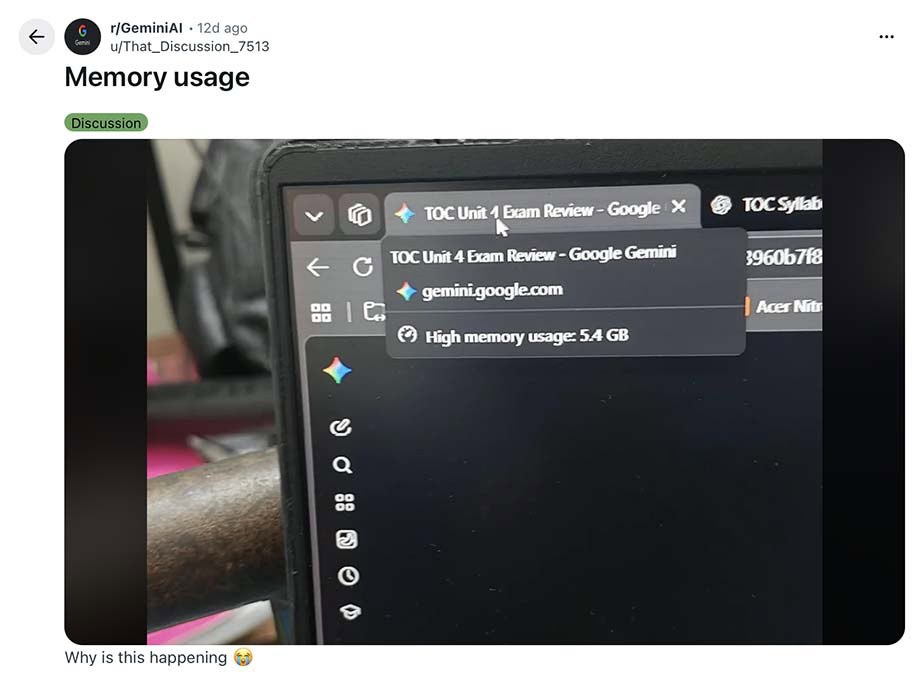
- 💻 Users had reported more than 5 GB of RAM, in one case a peak of 8.4 GB
- ❓ Google has not explained the cause or the fix
- 🔍 Android Authority has not been able to verify the fix independently
🛠️ Google says the high memory use of the [Gemini](https://gemini.google.com) web app in the Chrome browser has been fixed, Android Authority reports. The official Google Support account stated this in a Reddit comment under a post whose screenshot showed more than 5 GB of RAM in use. 💻 Complaints that Gemini in a browser tab can slow a computer to a crawl go back more than a year. Google has not explained what was wrong or what it changed. It asked users to report back if they still see high usage. Android Authority says it has not been able to check the fix itself.
📈 How long this has been going on shows in a Reddit thread more than a year old that Android Authority dug up: a Gemini tab was using 3.6 GB there. According to the person who posted it, consumption grew with the length of the session and not with the length of the conversation. A chat with just five messages and one PDF attachment started at around 250 MB and reached 900 MB after 15 minutes.
🧪 More reports followed over the year. One described 1.1 GB in Chrome, another 6.4 GB for the web app with usage peaking at 8.4 GB. All of these figures come from individual users, and the reports do not say how many people were affected.
🤖 Some commenters joked that numbers like these made it look as if Gemini were running a local AI model inside the browser. Android Authority points out that Chrome does install local AI models, but they take up disk space and do not sit in RAM.
🖥️ The Italian site TecnoAndroid assumes that Google has corrected the fault on its own servers, or is still doing so, because nothing was said about how the fix is delivered. Users would then have nothing to install and no setting to change. Google has not confirmed that this is how it works.
🔍 To see whether your own machine is still affected, Android Authority names two built-in tools:
- **Chrome's Task Manager**, which shows the memory in use
- the **hover card** that appears when you point at a tab
📮 Remaining problems can be sent to Google with Chrome's built-in option for reporting an issue.