🎬 Orcah Studio: search your own video library locally by what was said, who appears and what happens
In brief
- 🎬 Orcah Studio (formerly Edit Mind) transcribes and analyses your own videos so single scenes can be found with a plain-language search.
- 🔒 Analysis runs on your own machine; according to the developer, nothing is uploaded.
- 🐳 The Docker edition is open source (AGPL-3.0) but, per the project page, still in active development and not production-ready.
- 💻 The Mac app costs a one-time $199 (until November 30, otherwise $249) and needs an Apple Silicon Mac with 16 GB of memory.
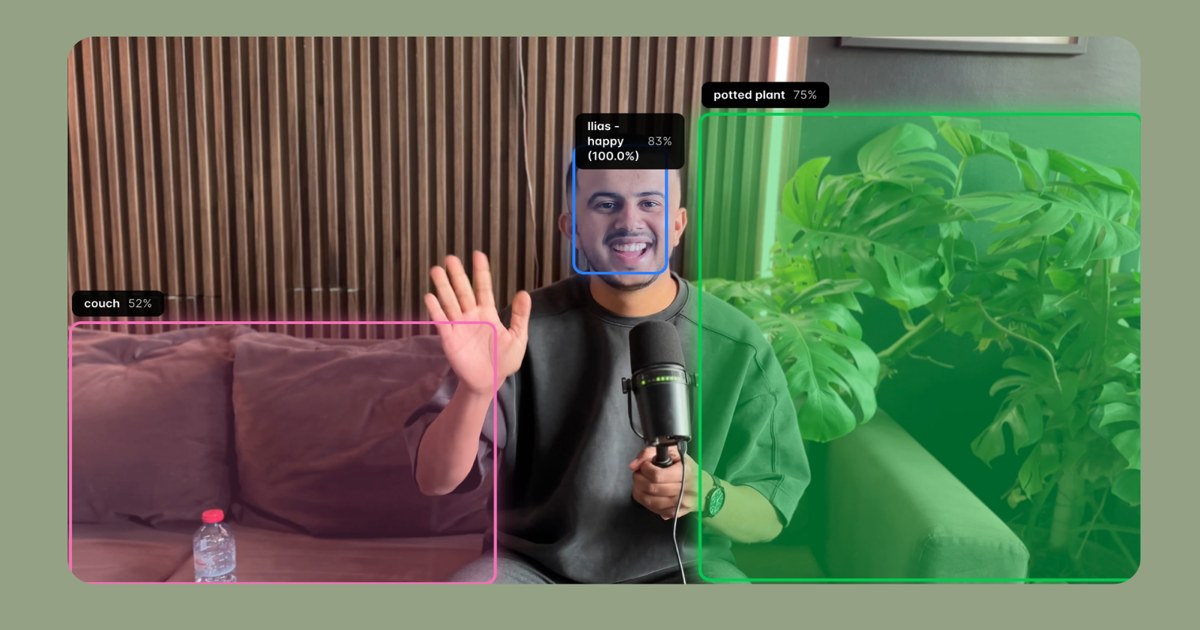
🎬 Anyone who has filmed for years knows the problem of not finding that one shot again. Orcah Studio by developer [Ilias Haddad](https://orcah.app) tackles it: the software goes through a video collection, transcribes who says what, recognises faces, objects and on-screen text, and builds a searchable index. You then search in plain language for whatever you remember and land on the matching moment. Until recently the project was called Edit Mind. 🔒 Everything runs locally; according to the maker's site no video is uploaded, and once the models are downloaded it also works offline. There are two ways to use it: a free, open-source Docker edition under the AGPL-3.0 licence that runs in the browser, and a paid Mac app that hands clips to Final Cut Pro, DaVinci Resolve and Premiere Pro. The project says the Docker edition is still in active development and not production-ready, so expect bugs and unfinished features. 💻 The Mac app costs a one-time $199 instead of the regular $249, an offer that runs until November 30. It needs an M1 or later Mac, at least 16 GB of memory and macOS 14. Versions for Linux and Windows PCs with an Nvidia GPU are due on December 29, 2026.
🧩 **How the index is built.** In the Docker edition a background service watches a chosen folder and queues new video files for analysis. A Python service does the work: OpenAI's Whisper for transcription, YOLO for object detection, DeepFace for faces, plus text detection and scene analysis. The results are stored as vectors in ChromaDB, the bookkeeping in PostgreSQL. In his launch post the developer also describes speaker diarisation and multi-modal embeddings built with open-weight models. For handling the plain-language queries you choose during setup between a local model through Ollama (the default is the 7-billion-parameter qwen2.5) and Google's Gemini API. Choosing Gemini means an API key and requests going to a cloud service; you can also skip the AI setup for now, in which case the AI features stay unavailable.
🐳 **Installation.** According to the instructions, one command with Docker Desktop open is enough: it downloads an install script that asks for the video folder and the language model, writes the configuration and starts all containers. Docker only gets access to the folder you pick. Machines with an Nvidia GPU get their own Compose file with CUDA. You then open the web interface in the browser, select the folder and start a scan. Those who prefer to set everything by hand find the manual steps in the repository on [GitHub](https://github.com/IliasHad/orcah-studio). Package names and older material partly still carry the old name Edit Mind, so you will meet both names.
🍎 **The Mac app.** The desktop version needs no Docker and is built for Apple Silicon. How thoroughly it indexes depends on memory, according to the maker: with 16 GB you get transcripts with speakers, faces, objects, colour, on-screen text and sound, plus short captions for one frame every two seconds; big batches run best overnight. From 32 GB it adds full AI descriptions of every scene and checks a frame every second. The models need 20 GB of free disk space. Macs with 8 GB and Intel Macs are not supported. The licence does not expire and includes one year of updates; after that another year of new features costs $49, and if you do not renew you keep your version and, the maker says, continue to get security patches. One licence activates on up to two computers, and there is a 30-day refund.
🎞️ **What it reads and where it sends clips.** The maker lists MP4, MOV, M4V, AVI, MKV, WebM, OGV and MXF; MXF is first transcoded into a working copy that takes extra space. The original files stay where they are, including on external drives or a NAS. Found clips can be sent to Final Cut Pro, DaVinci Resolve (including the free version) and Premiere Pro. Through an MCP server, AI assistants such as Claude or Cursor can also search your footage; the developer speaks of more than 45 tools.
🧪 **Still in testing.** According to Ilias Haddad, videos can also be linked with Strava activities, and camera data such as ISO, shutter speed, lens and location are read when present. An iPhone app that indexes videos and syncs them with the Mac library, and indexing on a Linux machine with the Mac as a client, are early alpha versions in his words, and testers can ask for access by e-mail.
🤔 **Who it suits.** The tool makes sense for people with large personal video archives, such as filmmakers, editors, content creators or families with many phone videos, who do not want to hand their footage to a cloud. Anyone with a few clips, an older Mac or the expectation of a polished product is poorly served by the Docker edition for now. Face recognition runs locally but still processes biometric data of the people filmed, which is worth keeping in mind when filming others. The developer says he will keep maintaining the open-source Docker edition and fund it through sales of the Mac app.