📚 Folio: a team wiki in Git that people and AI agents edit together
In brief
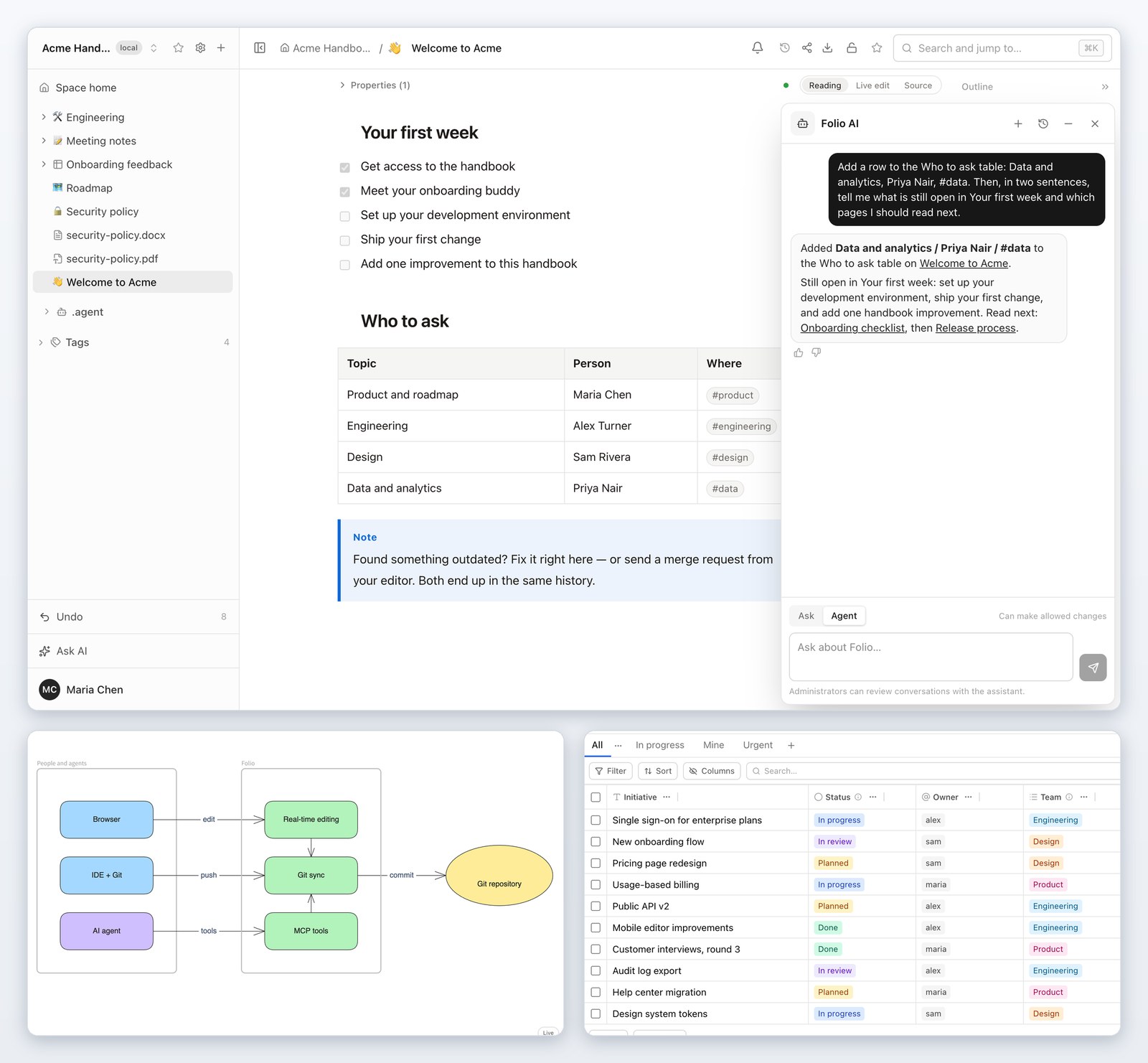
- 📚 Folio is a self-hosted wiki: pages, data tables and whiteboards are files in a Git repository.
- 🔁 Edits in the browser become real commits with the person who edited as the author.
- 🤖 AI agents such as Claude Code or Cursor read and write through an MCP server with their user's rights.
- 🐳 Runs with Docker Compose; MIT-licensed according to the maker, with a public demo.
📚 [Folio](https://foliowiki.online/) is a wiki for teams that you run on your own server. What sets it apart from Confluence or Notion: the content does not sit in a database but in ordinary files in a Git repository. Documents are Markdown, a data table is one readable Markdown file, a whiteboard is an SVG. Switch Folio off and the files stay with you. 🔁 Several people edit a page at once in the browser; after about 90 seconds of quiet, or at the press of a button, a Git commit appears with the person as author. Those who prefer their code editor push their changes, and both land in the same history. An Obsidian vault can also be opened as a team wiki. 🤖 AI agents are treated as users in their own right: an MCP server gives Claude Code, Cursor, ChatGPT and other clients access to the same pages, with the rights of the person who owns the access. A built-in assistant runs on your own Cursor or Anthropic key. 🐳 Folio comes from Evergreen IT Development; founder Sergii Kravtsov says it is open source under the MIT licence and was written entirely by AI agents. It installs with Docker Compose, and a demo can be opened without signing up.
🏢 Where it comes from. Kravtsov, CEO of Evergreen, describes the trigger in a post on HackerNoon: his company of about 50 people worked in Confluence until an Atlassian reseller partner failed and processes nearly stopped for two days. The AI agents the team already used had no knowledge source during that time either. He drew four requirements from it: knowledge lives in Git as plain files, people and agents work from the same base, the licence is MIT, and everything runs on servers the company controls. Outline, Docmost, BookStack and Notion did not meet all four at once, he writes. The way it was built stands out: by his account Folio was written entirely by AI agents, while he decided what to build and checked behaviour in a browser rather than reviewing code line by line. The README says so openly.
📂 How Git and the wiki fit together. A space of the wiki is a folder in a repository; several spaces can share one repository, so documentation can sit right next to the code. When docs live in a product's docs folder, a writer edits them in the browser while developers see the commits with git pull. Front matter written by Docusaurus, MkDocs, Hugo or Jekyll is kept unchanged, the README says. Sync state is always visible; in a conflict, the option to take the Git version first saves the current state to a backup branch. Because the wiki is a repository, diff, blame, revert and merge requests work as they do for code.
🗂️ What goes beyond text. Data tables with saved views, forms that write into a table, Excalidraw whiteboards, Mermaid diagrams edited with the mouse or as code, and PDF and Office files for viewing. Documents and boards already opened keep working offline. A space can be published as a public read-only website, optionally with an AI question box for visitors. For teams the README lists groups, single sign-on via OpenID Connect and SAML 2.0, SCIM, an audit log and inherited page restrictions. A Confluence import takes single pages or whole trees; not every macro has an equivalent, so Kravtsov advises a trial import first.
🤖 The agent side in detail. The MCP server offers 52 tools according to the README, from searching and writing pages through tables and whiteboards to checking a page against the space's writing rules. Clients connect with a personal token or through OAuth 2.1, and ready configurations are included for Claude Code, Cursor, VS Code, Codex, n8n and Open WebUI. An administrator can switch agents from writing directly to sending edits for review. Every space has a .agent folder: whatever stands there as ordinary pages, such as role, tone, glossary and rules, becomes the instructions for that space's assistant, with version history in Git. Claude artifacts can also be published into the wiki as interactive pages over MCP.
🔑 What you bring yourself. Folio does not resell AI usage. The built-in assistant needs a Cursor key or a usage-billed Anthropic API key, personal, per space or for the whole instance; a Claude subscription does not work. The pages the assistant reads go to the chosen provider. Without a key everything else works as usual. Costs, Kravtsov writes, are the server, the upkeep and the agent subscription, not per-seat fees. There is no mobile or desktop app, only a web interface.
🧭 Who it suits. Folio is for teams that do not want their knowledge in someone else's system, are comfortable with Git and want AI agents to work on the same documentation. Anyone who does not want to run a server is better served by a hosted service. It can be tried in the [demo](https://demo.foliowiki.online): a shared login, reset daily, with Git, import and AI switched off. The code is on [GitHub](https://github.com/evergreen-it-dev/folio).